Interviews
How to Practice for an Interview by Yourself—and Know What to Improve
One practice round, start to finish: answer aloud, draw a follow-up, review what you said and change one thing.
Theophilus OyetiOct 30, 2026
Five AI mock interview tools compared on practice format, follow-ups, feedback, free limits and price.
If you have an interview coming up, choose an AI mock interview tool for four things: the practice format you'll face, questions tied to your actual role, feedback that points to what you said, and access you can use before the interview. A high score tells you little on its own. Each vendor scores differently, and no score is an employer's rubric.
The short version:
Disclosure: RemoteWorldwide publishes this guide and offers one of the tools included. We compared all five on the same criteria using each company's official product, pricing, help and privacy pages, checked on October 30, 2026. We didn't test the products, so nothing here claims one tool's feedback is more accurate than another's. "Not documented" means we didn't find it in those pages, not that the feature doesn't exist.
We compared what each tool documents about role context (job description, resume or your own questions), practice format, follow-up questions, answer and delivery feedback, recordings and transcripts, cost and privacy.
| Tool | Good fit if you want | Format | Free access | Main caveat |
|---|---|---|---|---|
| Big Interview | Lessons plus practice | Recorded video answers; voice-only simulator | No free plan listed | Adaptive follow-ups not documented |
| Huru | Free practice without a session cap | Live AI interviewer (audio or video), or one question at a time | All job-seeker features free, mock interviews listed as unlimited | Delivery feedback only in live interviews |
| RemoteWorldwide | Practice built from a posting and your resume | Live voice interview | 1 voice interview a month | Voice only; no typed practice mode |
| Teal | Practice linked to jobs you track in Teal | Live AI interviewer, audio and video | Up to 2 sessions | Use of your resume not documented |
| Yoodli | Delivery coaching and custom roleplays | Live AI roleplay | 5 sessions in total | Job description or resume upload not documented |
Consider it if you want structured teaching as well as rehearsal, and you can pay or already have access through a school or employer.
Big Interview pairs practice with a lesson library. Its homepage lists 170 video lessons and a bank of more than 10,000 questions. Its interview simulator page says it can generate personalized questions from your resume or a job description, and describes a voice-only mode modeled on a phone screen. Its VideoAI page covers recorded video answers with feedback on pace, vocabulary, eye contact, body language and filler words. The pages we read don't describe follow-up questions that respond to your answers.
Feedback and review: the simulator page promises a report on delivery and answer quality, with tips after each session. The privacy policy says recordings are stored in your account and mentions transcripts and scores. Recordings are deleted when you delete your account, with backups kept for up to 35 days. The policy doesn't describe deleting a single recording.
Cost: the personal pricing page, in dollars, lists Interview BootCamp at $39 for a 30-day subscription, Interview Accelerator at $99 for three months, and Interview Pro at $299 as a one-time fee with lifetime access. The lowest commitment is $39 for 30 days. Big Interview also sells to universities, workforce programs and employers, so check whether you already have access.
Check before buying: whether your plan renews automatically, and the conditions on its refund guarantee.
Consider it if you want spoken practice with follow-ups and don't want to pay.
Huru's homepage describes two modes: a live AI interviewer, audio only or on video, and recorded answers to one question at a time. You can choose a role from its library, paste a job title and description, or write your own questions. The live interviewer is described as asking follow-ups and probing vague answers, in sessions of 5 to 20 minutes. It runs as a web app, an iOS app and a Chrome extension. The press page lists English, Spanish, Portuguese, German and French.
Feedback and review: Huru's scoring page says each answer gets a score out of 100 from Huru's own model. The score covers relevance, structure, specificity, impact and ownership, and articulation, and you get a suggested stronger version of the answer. Delivery measures such as pace, pauses, filler words and on-camera feedback come only with live interviews. Recordings come with a synced transcript you can step through answer by answer.
Cost: the homepage says every feature for job seekers is free, including unlimited mock interviews. The only paid plans are for enterprises.
Check before choosing: Huru's footer links to a privacy policy, but its text didn't load for us. Its terms of service, with Beatview, Inc. as the operator, don't cover recordings. Read the policy in your browser before recording. Its pace guidance also names a specific "confident" range of words per minute. Treat that as one tool's setting, not a universal standard.
Consider it if you want to rehearse out loud for a specific job you're applying for, using questions written from that posting and your resume, and keep your preparation alongside the rest of your applications.
RemoteWorldwide's mock interview is a live voice conversation. You choose a behavioural, portfolio walkthrough or salary conversation, a 6-, 15- or 25-minute length, and a difficulty level. Warm-up asks no follow-ups. Standard follows up when an answer is vague. Tough follows up on most answers. Interview prep is linked to the posting and to the platform's application tracker, much as Teal links practice to the jobs you track.
Feedback and review: the report covers structure, specifics, ownership, relevance and confidence, with each point tied to a quote from your answer. A delivery section covers pace, long pauses, filler words, pitch variation and energy, flagged on the recording. You get the recording with a synced transcript and can jump to the moment a note refers to. It also suggests a better answer for each question, which you should check against what you actually did before using any of it.
Cost: the pricing page, in dollars, lists a Free plan at $0 with 45 AI credits a month and one voice mock interview a month. That cap applies on Free even if you have credits left. Each session uses 5 credits for up to 10 minutes, then 1 credit for each extra started minute. On paid plans, extra interviews draw on your monthly credits: 100 on Basic, 200 on Pro and 400 on Ultra. Credits are shared with the platform's other AI features. Quarterly billing is $45 (Basic), $80 (Pro) or $150 (Ultra) per three months. Yearly billing is $163, $299 or $549. The pricing page also offers monthly billing, so check the current monthly price there.
Privacy: the privacy policy says every session is recorded, and that the recording, transcript and report are kept until you delete the session or your account. It also says the voice provider that runs the live interviewer keeps its own copies, which deleting a session doesn't remove.
Practice out loud
Practise the questions this company actually asks, get scored on your answers, and walk in prepared.
Start practisingConsider it if you already track applications in Teal, or want practice linked to jobs you've saved.
Teal's AI interview practice is a conversational AI interviewer that runs in your browser using your microphone and camera. You start a session from a role you're tracking, and the tool page says it uses your saved job descriptions. You can choose a screening, technical or culture-fit interview. Teal's help article says the interviewer takes your answer into account before deciding on a follow-up. The pages we read don't say whether your resume is used.
Feedback and review: you get feedback after each session on your overall performance and your answers, plus analytics on speaking pace, response length and engagement. Recordings and transcripts are available afterwards, along with your session history. Numeric scores and suggested answers aren't documented.
Cost: Teal's plan comparison gives free users up to two practice sessions. It doesn't say whether that allowance resets. Teal+ makes sessions unlimited, at $29 a month or $79 a quarter in USD. The weekly price is $9 on the pricing page but $13 on the plan comparison and tool page, so confirm it at checkout.
Privacy: Teal's privacy policy says data is kept while your account is active, and personal information is deleted or anonymized within 30 days of account deletion. It says career content may be used, anonymized and aggregated, to improve Teal's AI models. The policy doesn't specifically address interview recordings or transcripts.
Consider it if delivery is your main concern, or you want to design custom roleplays beyond standard interview questions.
Yoodli's interview practice guide describes a live AI roleplay. You enter the role and company, choose the interviewer's demeanor, and can pick questions from a bank or add your own. The AI adds follow-up questions based on your responses. A microphone is required. The camera is optional, and turning it on adds feedback on body language. Uploading a job description or resume isn't documented. Yoodli also covers public speaking and pitch practice.
Feedback and review: you get an analysis after each session. The recording library holds your roleplays and practice sessions, and you can download, share or delete them. Yoodli's release notes say transcripts can be downloaded as text files. Automatic deletion settings are tied to plans or organizations that include data deletion, so check which controls apply to your plan. Specific content criteria for interview answers aren't documented for individual users.
Cost: the pricing page, in dollars, lists a free Starter plan with five sessions in total, counting any session over 30 seconds. Pro is $8 a month billed annually, with up to 10 roleplays a week. Advanced is $20 a month billed annually, with unlimited roleplays and your data excluded from AI training. That works out to $96 and $240 a year, our calculation rather than a checkout price. The page shows a monthly billing option, but we couldn't confirm its price. Yoodli says it doesn't refund on cancellation.
Privacy: Yoodli's privacy policy says Starter and Pro session data may be used to improve the platform, and you can opt out in your profile settings. On Advanced, your data is excluded from AI training by default.
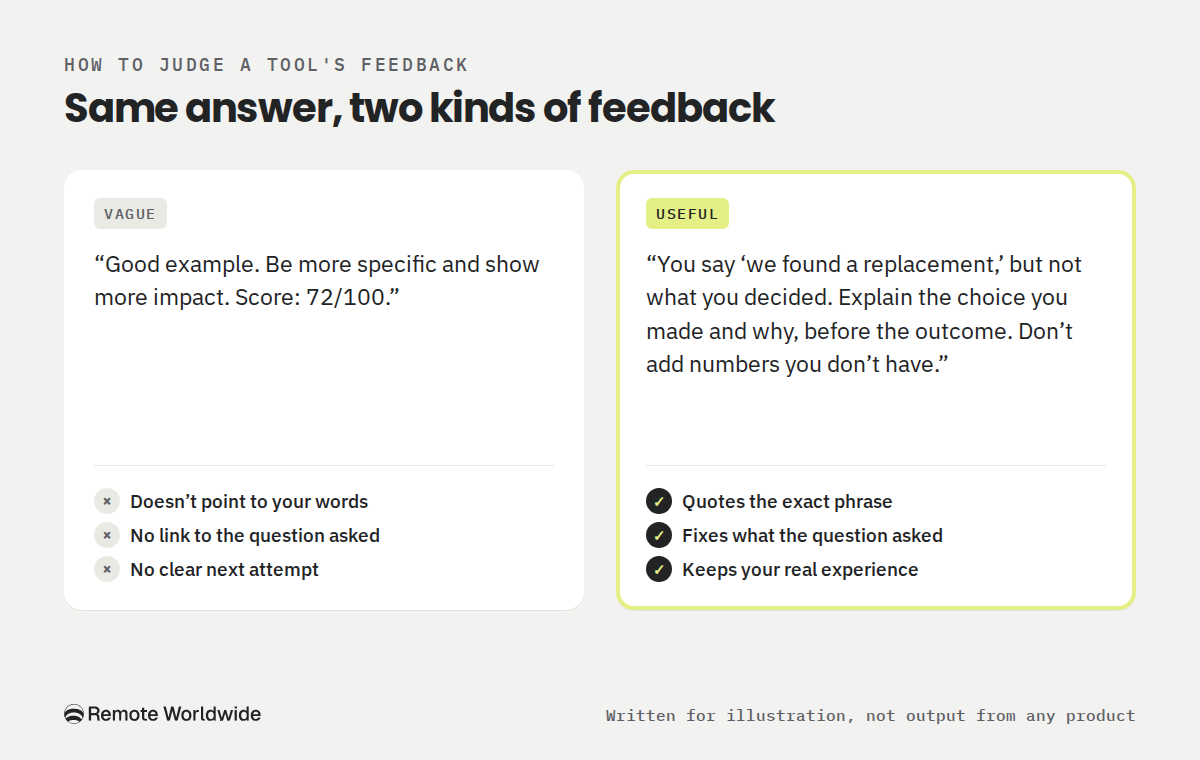
Before trusting any tool, look closely at one piece of its feedback. The example below was written for illustration. It wasn't generated by any of the products in this guide.
Question: Tell me about a time you had to change a plan at short notice.
Candidate's answer: "Our venue cancelled two days before a client workshop, so we had to move fast. We found a replacement and the workshop went ahead. The client was happy with how it went."
Vague feedback: "Good example. Be more specific and show more impact. Score: 72/100."
Useful feedback: "You say 'we found a replacement,' but not what you decided. The question asks how you changed the plan, so explain the choice you made, such as which options you weighed and why you picked one, before the outcome. Don't add numbers you don't have. If 'the client was happy' is all you know, say what they said or did."
In your own trial, check whether:
If a tool mostly gives scores and general advice, you'll have to do more of the diagnosis yourself. Our guide to practicing for an interview by yourself shows how.
You need spoken practice now and don't want to pay. Huru documents free live interviews with follow-ups and no stated session cap. RemoteWorldwide (one interview a month), Teal (two sessions) and Yoodli (five sessions) also let you try spoken practice for free. Choose based on how you want questions set up: from a pasted job description (Huru), from a posting and your resume (RemoteWorldwide), from a job tracked in Teal, or from a role and company you type in (Yoodli).
You want to be taught, not just tested. Big Interview's lesson library is the clearest documented match. It's paid, so check for school or employer access first.
You want practice tied to the jobs you're applying for. Teal and RemoteWorldwide both connect practice to jobs you're tracking. If you already manage applications in one of them, start there.
Delivery is your main concern. Big Interview, Huru and RemoteWorldwide document pace and filler-word analysis. Teal reports pace and response length. Yoodli describes visual, verbal and vocal delivery analysis without listing interview-specific measures. Huru and RemoteWorldwide also let you jump from a note to the moment in the recording. Treat pace targets as prompts to listen back, not rules. There's no single correct speed or accent.
Start with a free option that supports the format you need. Pay when you need a capability or allowance the free option lacks, such as a structured course, more sessions than its cap, or stronger data controls like Yoodli Advanced's default exclusion from AI training. Having an interview, or practicing for several weeks, isn't by itself a reason to pay. If a free tool already gives you the format and feedback you need without a cap, staying free is reasonable.
Before subscribing, check whether a school, employer or workforce program already gives you access. Compare the amount you'll actually be charged for the shortest commitment, not the monthly equivalent of an annual plan. And remember that no score is a hiring decision, these tools can't know your interviewer's questions, and any suggested answer still needs checking against what you actually did.
If you want practice built from the job you're applying for, use RemoteWorldwide's free interview to judge two things: whether the questions fit your role, and whether the report points to one specific improvement. Create your free RemoteWorldwide account and explore interview practice.
Practice out loud
Practise the questions this company actually asks, get scored on your answers, and walk in prepared.
Start practising
One practice round, start to finish: answer aloud, draw a follow-up, review what you said and change one thing.
Theophilus OyetiOct 30, 2026
One fictional applicant, several worked answers: how to turn real experience into application answers a reader can check.
Theophilus OyetiOct 29, 2026
Several applications, several decisions: a simple tracker that tells you what to do next.
Theophilus OyetiOct 21, 2026