An email arrives from Tessaro: the hiring manager would like to talk next Thursday. Maya Bennett, the fictional job seeker we’ll follow through this article, applied two weeks ago. Since then the posting has come down, she’s sent more than one version of her resume to other companies, and she can’t remember what she wrote in Tessaro’s application questions.
She doesn’t have to guess. Her tracker row for Tessaro has a saved copy of the posting, the resume file she sent (CSM-v2) and her application answers. Within minutes she knows exactly what the interviewer has read about her, and she can prepare for the real job description instead of a half-remembered one.
Maya uses a spreadsheet, and a spreadsheet is enough. What makes it work isn’t the software. Each row keeps the context she’ll need later, she updates it when something changes, and every row ends in a next action.
A good job application tracker doesn’t just record where you’ve applied. It tells you what to do next.
What a tracker actually needs to do
A tracker earns its place if it can answer these questions in under a minute:
- What have I applied to, and with which resume?
- Which applications are still active, and which are finished?
- What is the next action on each one, and when is it due?
- Which interviews are coming up, and what do I need to prepare?
- What can I learn from the applications that got replies?
If yours can’t answer the third question, it’s a log, not a tracker.
Build the minimum tracker first
You don’t need twenty columns. Start with these, in Google Sheets, Excel, Notion or whatever you already use.
| Field | Why it’s essential |
|---|---|
| Company and role | Use the exact job title. You may apply to two roles at one company. |
| Posting | A link and a saved copy, because postings get taken down. |
| Date applied | Leave it blank until you actually submit. |
| Status | One clear stage (definitions below). |
| Resume version | The file name you sent, such as “CSM-v2”. |
| Next action | One concrete step, or “None: waiting”. |
| Next action date | The day you’ll act or check again. |
| Notes | Optional but useful: contacts, feedback, anything you’d forget. |
Add a field only when it solves a problem you’ve actually had:
- Contact name once you have a real person to reply to.
- Interview date when interviews start (or put them in your calendar).
- Working hours or location fit after a role turns out not to match.
- Source or referral once you have enough applications to compare where they came from.
- Salary range when you’re comparing offers or answering screening questions.
Copy this into cell A1 of a blank sheet, then use “Split text to columns” (Google Sheets) or “Text to Columns” (Excel) with a comma separator:
Company,Role,Posting link,Saved copy,Date applied,Status,Resume version,Next action,Next action date,Notes
Tessaro,Customer Success Manager,https://example.com/tessaro-csm,Tessaro-CSM.pdf,2026-10-16,Interviewing,CSM-v2,Prepare for hiring manager interview,2026-11-04,Interview Thu 5 Nov 3pm
Halvard,Account Manager,https://example.com/halvard-am,Halvard-AM.pdf,,Saved,AM-v1 (to tailor),Tailor resume and apply,2026-11-04,Posting closes 6 Nov
One job seeker, eight applications
Here is a tracker in use. Maya Bennett is fictional, and so are all eight companies. She has four years in customer-facing SaaS roles, applies for Customer Success Manager and Account Manager jobs, and only applies to remote roles open to candidates in her country. The dates belong to an illustrative scenario: it’s Monday 2 November 2026, and she’s doing her weekly review.
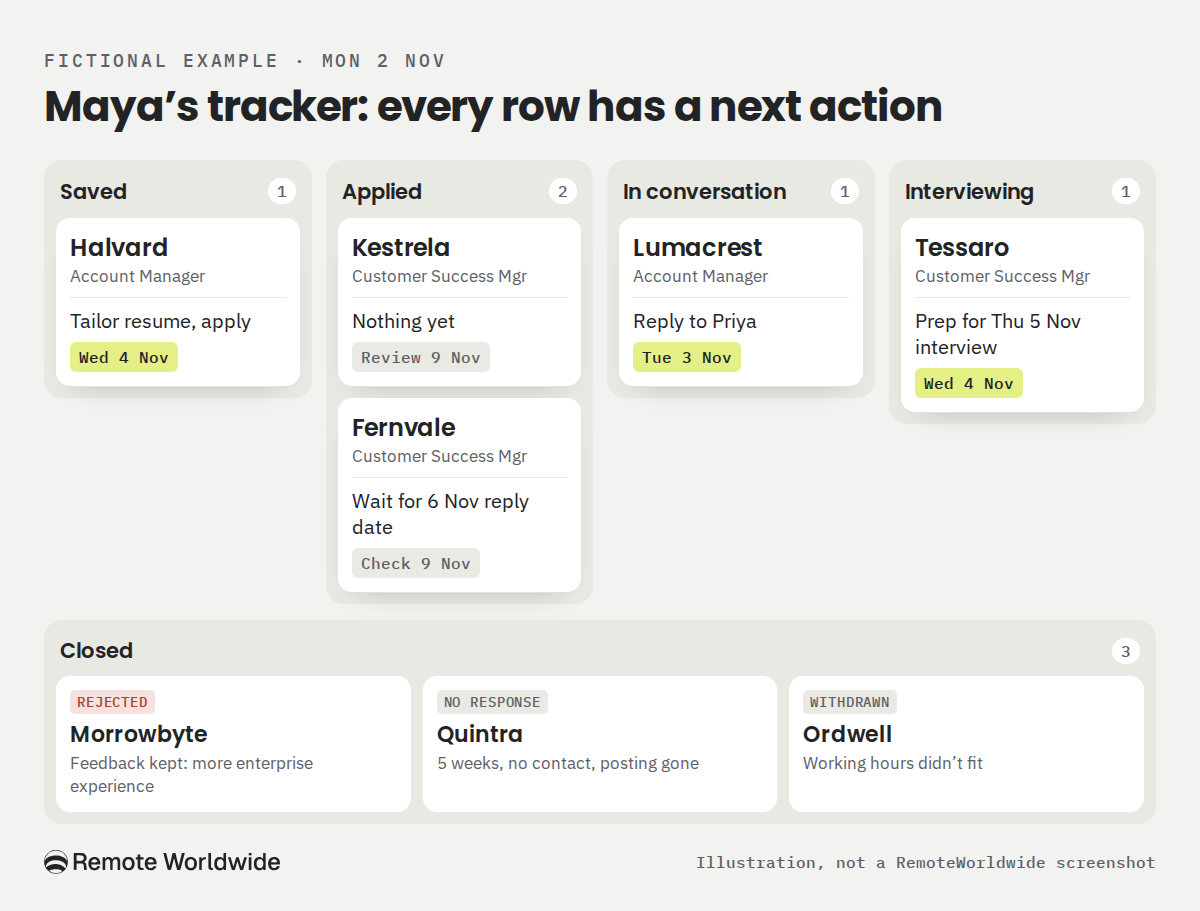
Here is what her tracker holds, and the decision each row needs:
- Halvard, Account Manager · Saved. Next: tailor her resume and apply by Wed 4 Nov. It isn’t an application yet, so there’s no date applied. The posting closes Fri 6 Nov, so she leaves two days’ margin.
- Kestrela, Customer Success Manager · Applied Sun 1 Nov. Next: nothing until next week’s review (Mon 9 Nov). It went in yesterday, and a follow-up now would only be noise.
- Fernvale, Customer Success Manager · Applied 14 Oct. Next: wait, then check Mon 9 Nov. The automated confirmation promised a reply by Fri 6 Nov, and there’s no named contact, so she lets that date pass first.
- Lumacrest, Account Manager · Applied 22 Oct, now In conversation. Next: reply to Priya, the recruiter, with a salary range and call times by Tue 3 Nov. Priya has emailed twice and is waiting on Maya, so this is the most time-sensitive row.
- Tessaro, Customer Success Manager · Applied 16 Oct, now Interviewing. Next: prepare by Wed 4 Nov for Thursday’s hiring manager interview. Preparation matters more than any follow-up here: the saved posting, the CSM-v2 resume they saw, and examples for each listed responsibility.
- Morrowbyte, Customer Success Manager · Applied 12 Oct, now Rejected. Next: close it today and keep the feedback. Their one line, that they wanted more enterprise experience, is the most useful data point on the sheet.
- Quintra, Customer Success Manager · Applied 28 Sep, now No response. Next: close it today. Five weeks of silence, no contact, and the posting is gone. That isn’t a rejection, but it no longer needs her attention.
- Ordwell, Customer Success Manager · Applied 19 Oct, Withdrawn Fri 30 Oct. Next: none. The recruiter screen revealed the role needs full overlap with US Pacific working hours. She withdrew with a short thank-you and added a “Working hours” field to check before applying next time.
Three applications need attention this week, two need to be closed and recorded, two are awaiting responses, and one has already been withdrawn.
Use statuses that mean one thing each
Statuses are only useful if each one implies a different kind of attention.
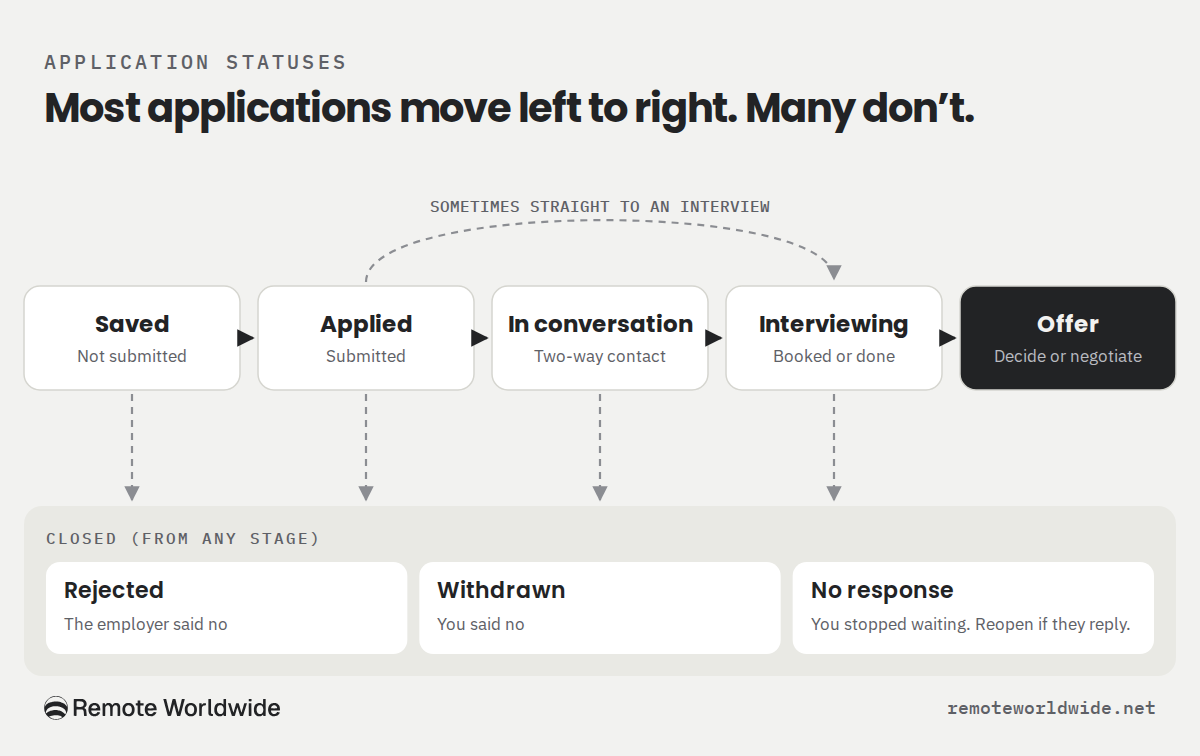
- Saved: you want to apply but haven’t submitted. Apply before the closing date, or delete it.
- Applied: submitted. An automated confirmation doesn’t change this. Usually there’s nothing to do until a timeline passes.
- In conversation: a real person has replied and there’s two-way contact. Reply promptly, because you often owe the next move.
- Interviewing: an interview is scheduled or has happened, including recruiter screens. Prepare, then send a thank-you.
- Offer: you have an offer to consider. Decide, negotiate or ask for time.
- Rejected: the employer said no. Close it and keep any feedback.
- Withdrawn: you said no. Close it, and note why if it helps future choices.
- No response: you’ve stopped expecting a reply. Close it, and reopen it if they get in touch.
On a board, the first five become columns, left to right, and the last three share one Closed column. Not every application moves neatly along the line: some jump from Applied to Rejected, some go straight to Interviewing, and you can withdraw at any point.
No response is not a rejection. Closing a row in your own tracker doesn’t mean the employer has turned you down. It means you’ve decided to stop spending attention on it. Close an application when the employer’s stated timeline has passed and a follow-up (if you had someone to send it to) has gone unanswered, or when there’s no timeline, no contact and several weeks of silence. A four-to-six-week cutoff is a reasonable personal default. It’s an organizing habit, not an employer deadline or hiring rule, and some employers take longer, so reopen the row if they reply. Trackers label this status differently: RemoteWorldwide’s, for example, calls it “ghosted”.
Decide when to follow up
There’s no universal waiting period. One career center, for example, suggests waiting about 7–10 days after applying unless the posting gives a timeline, and notes that one follow-up is usually enough (UNLV Career Services). Treat numbers like that as starting points. The situation decides:
- You were rejected: don’t follow up. Close the row.
- The employer gave a date: wait until it has passed, plus a couple of working days.
- The posting or employer asks for no calls or emails: respect it.
- You have a named contact you’ve spoken with: one short follow-up after a week or two of silence is reasonable.
- You applied through a portal with no contact: check the portal and your inbox. Don’t hunt down employees who have nothing to do with the hiring.
- You’ve had an interview: send a brief thank-you, ideally within a day. If they gave a decision date, wait for it.
- You’ve already followed up once without reply: stop. Move it toward No response at your next review.
For Maya, that means no messages to Kestrela, Fernvale or Quintra this week. Her only outgoing messages are her reply to Priya and, after Thursday, a thank-you to Tessaro.
Two short examples:
After applying (to a contact you’ve been in touch with; swap in your details)
Hi [Name], I applied for the [role] on [date] and wanted to check in on timing. I’m still very interested, especially in [one specific thing from the posting]. Happy to send anything that would help. Thanks, [Your name]
After an interview (Maya’s note to Tessaro’s hiring manager)
Hi Daniel, thanks for your time on Thursday. Hearing how your team handles renewal risk made me more interested in the role. If it’s useful, I’m happy to share the account-review template I mentioned. I look forward to hearing about next steps. Best, Maya
Both are short, specific to the conversation or posting, and ask for nothing more than an update.
Stay on top of it
Never lose track of an application again
A board for every application, follow-up reminders, and a streak that keeps the search moving.
Track my applicationsKeep the context, not just the company name
Maya’s Tessaro preparation took minutes because the row held more than a company name. When an invitation arrives, these are the things you’ll want to have to hand:
- The posting itself. Save a copy (PDF or plain text) when you apply. Postings can disappear once a role closes, and you may need it weeks later.
- The exact job title and requisition number, if there is one, in case you apply to more than one role at the same employer.
- The resume version you sent. If you tailor your resume for each job, name files so each row can point to the exact one.
- Cover letter and application answers. Interviewers sometimes ask about what you wrote.
- The confirmation email and any recruiter messages, linked or noted in the row.
- Interview notes: who you met, what they asked, and what you promised to send.
Keep it to job-search information. Don’t store passwords, ID numbers or bank details in a shared or synced spreadsheet, and don’t keep copies of confidential material an employer shares during interviews longer than the process needs.
The 15-minute weekly review
A list becomes a system when you look at it on purpose. Once a week, go through every active row and ask four things: is an action due, does an interview need preparing, has anything gone stale, and is there anything to learn?
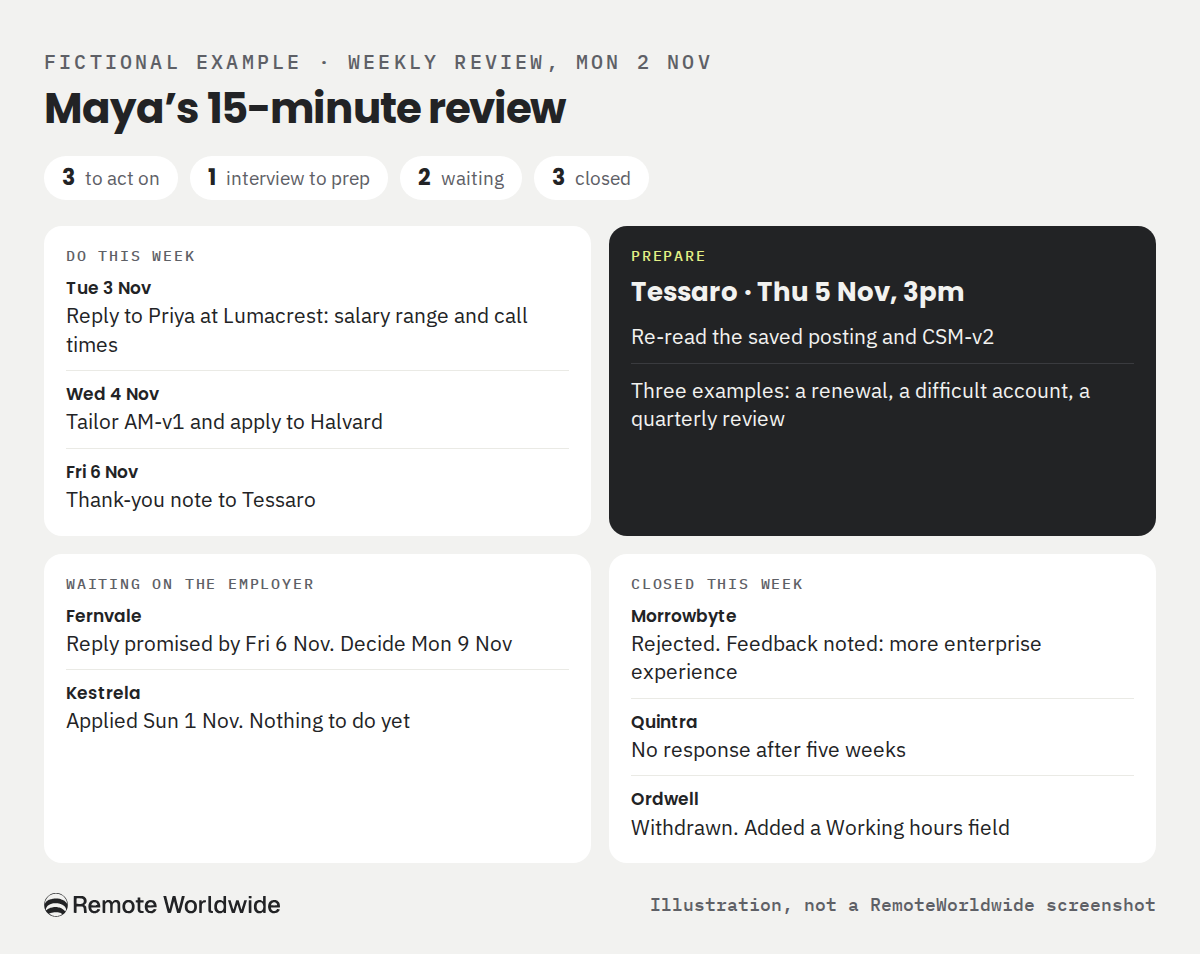
Here is Maya’s review on Monday 2 November, and the plan it produced:
| WhenAction | |
|---|---|
| Mon 2 Nov | Close Morrowbyte (Rejected) and Quintra (No response). Copy Morrowbyte’s feedback into Notes. |
| Tue 3 Nov | Reply to Priya at Lumacrest with a salary range and three call slots. |
| Tue–Wed | Prepare for Tessaro: re-read the saved posting and CSM-v2, and prepare three examples (a renewal, a difficult account, a quarterly review). |
| Wed 4 Nov | Tailor AM-v1 and apply to Halvard. |
| Fri 6 Nov | Thank-you note to Tessaro. Fernvale’s promised reply date. |
| Mon 9 Nov | Next review: decide on Fernvale, look at Kestrela. |
Two more decisions came out of the review. Her active list is four applications plus one saved, which she can manage properly, so she won’t batch-apply this week. And after Ordwell, she checks the new Working hours field before saving any role.
What your tracker can (and can’t) tell you
Once you have a few weeks of rows, three simple rates help. Define them before you count:
- Response rate: applications that got any non-automated reply, including rejections, divided by applications old enough to expect one.
- Interview rate: applications that reached at least one interview, divided by the same base.
- Offer rate: offers divided by applications that reached interviews.
Maya has submitted seven. Kestrela (one day old) and Fernvale (before its stated date) are too new to count, which leaves five. Four of those five got a reply: Lumacrest, Tessaro, Morrowbyte and Ordwell. Two reached interviews: Tessaro and Ordwell. There are no offers yet.
It’s tempting to look for a winning resume version, but five applications can’t show which one works better, because the roles, companies and timing all differ. What the tracker does tell her is qualitative and useful: one employer wanted more enterprise experience, and one role failed on working hours. Both change what she does next. Numbers become more trustworthy as rows accumulate. Use them to spot something worth testing, such as which kinds of role keep producing replies, not to grade yourself.
Spreadsheet or dedicated tracker?
A spreadsheet is enough for many people. It’s free, flexible and fully yours. Its weakness is that everything is manual: you copy in each job, update each status and remember each date.
| SpreadsheetDedicated tracker | ||
|---|---|---|
| Setup | Minutes | Minutes, plus learning the tool |
| Cost | Free | Varies (some are free) |
| Statuses and views | Whatever you build | Usually a board, list or calendar |
| Reminders | Manual, or calendar entries | Often built in |
| Context | Links and file names you maintain | Can keep postings, documents and history together, depending on the tool |
Switching makes sense when the manual parts start failing: you apply across many sites, you keep several resume versions, follow-ups slip, or you want each application connected to the resume, cover letter and interview prep you used for it.
Keep every application and its next step in one place
Everything Maya did by hand, from saving the posting and noting the resume version to setting a next action and preparing for the interview, is the work RemoteWorldwide is building into one job-search workspace.
RemoteWorldwide’s application tracker is designed to show your applications on a board, table or calendar, and to import jobs from a link. It reminds you when a follow-up may be due and drafts a message that you review and send yourself. Nothing is sent for you. Reminders follow set intervals, so weigh them against anything an employer has told you. Applications completed through RemoteWorldwide’s apply flow land in the tracker with the resume and cover letter you used, so the context is there when a recruiter calls. The tracker is listed as free on every plan, and access is opening in batches through the waitlist.
Join the waitlist for early access Until then, the remote job board is free to browse.
Whatever you use, the habit is the same: every row gets a next action and a date, and once a week you decide what to do with each one.
Sources
Stay on top of it
Never lose track of an application again
A board for every application, follow-up reminders, and a streak that keeps the search moving.
Track my applications- Job Application Tracker
- Job Search
- Application Follow-ups
- Job Search Organization
- Application Management
- Career Planning