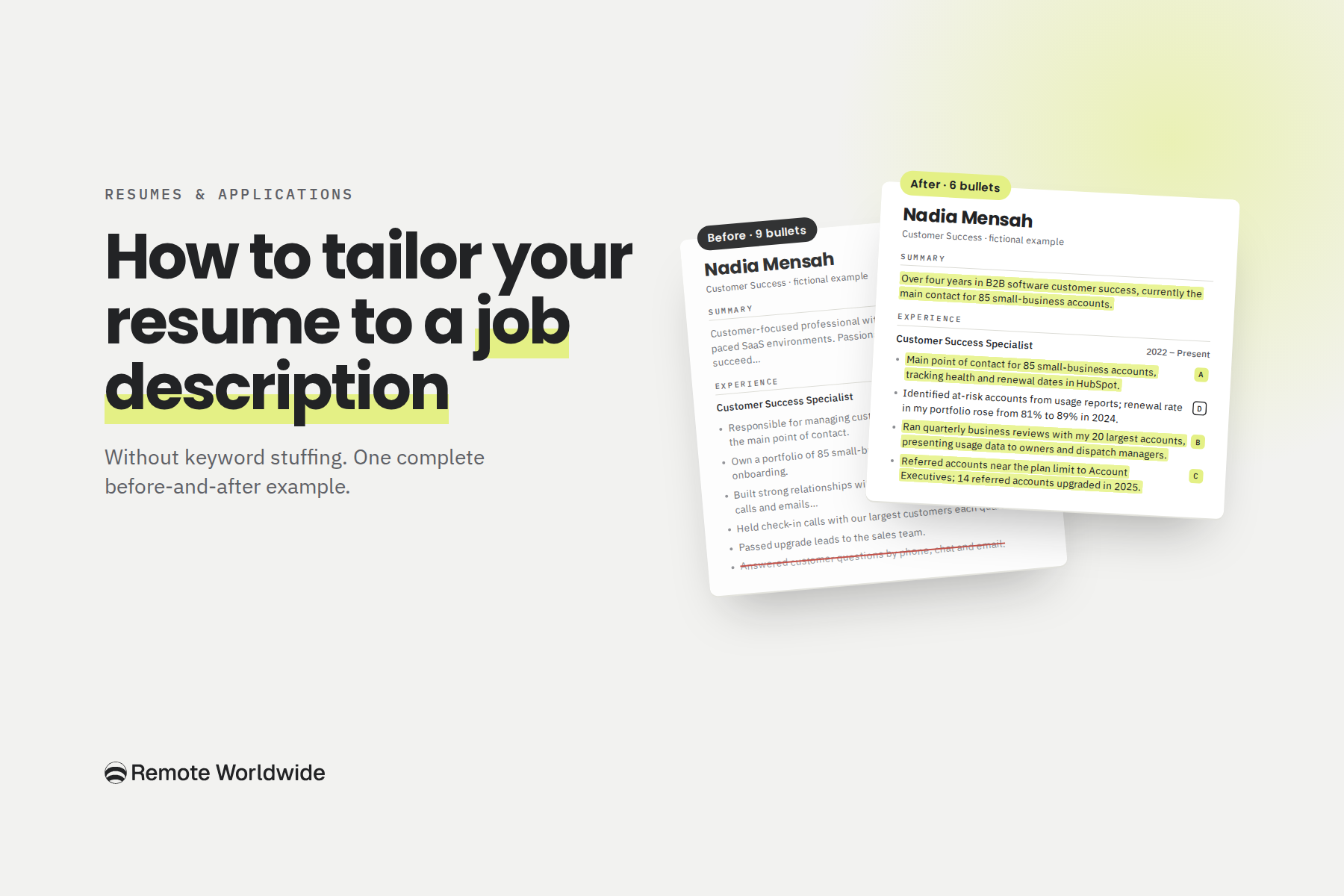
Picture a customer success specialist applying for a Customer Success Manager role. The job ad asks for quarterly business reviews and account expansion. Her resume has evidence of both, in bullets five and six: “held check-in calls with our largest customers” and “passed upgrade leads to the sales team.” Her first bullet, the one a skimming reader sees first, says “responsible for managing customer accounts.”
She doesn’t need new experience. She needs the experience she already has to be easier to find and easier to believe.
Tailoring changes how you present what you’ve done. It never changes what you’ve done.
What tailoring actually changes
A job description tells you what to emphasize, not which words to copy. Good tailoring is a handful of editing decisions:
- Reorder: put your most relevant evidence first.
- Rewrite: say what you did, for whom, and what changed.
- Name accurately: use the recognized term for tools and practices you’ve really used.
- Merge: combine bullets that say the same thing.
- Cut: remove what distracts from stronger evidence.
- Leave alone: anything that already does its job. This is the move most people skip.
Resume or CV? In the US and Canada, a CV usually means a longer academic record. In the UK the two words are used interchangeably (Coursera). This method works for either. Follow local norms on photos, date of birth and length.
Step 1: Sort the job ad before you touch your resume
Job ads mix the real work with wish lists, boilerplate and filler. Sort each line into one of these groups:
- Core responsibilities (“You’ll own…”, usually the first list): the work you’ll be judged on. Map your strongest evidence here.
- Must-haves (“Required”, years, credentials): make them easy to verify with titles and dates.
- Nice-to-haves (“Bonus”, “Ideally”): include only what you really have.
- Tools (named software and methods): name the ones you’ve used, spelled the usual way.
- Outcomes (“Improve retention”): find results you can point to, even partial ones.
- Generic language (“Fast-paced”, “team player”): not keywords. Show them through specific bullets.
Repetition isn’t importance. An ad that says “stakeholders” four times wants someone who talks to customers and colleagues a lot. It isn’t asking for four bullets about stakeholder communication. One bullet showing you presenting data to a customer’s leadership does more.
To set priorities, ask: what will this person spend most of their week doing, and what would make the hiring manager say they’re doing it well?
Step 2: Map each requirement to evidence you already have
Here is the whole process on one candidate. Nadia Mensah, Vantrell and Tallymoss are fictional, and the invented numbers stay consistent throughout.
Nadia has been a Customer Success Specialist at Vantrell, route-planning software for delivery businesses, since March 2022, after nearly two years in its support team. This is the job she wants:
The job ad (illustrative)
Customer Success Manager (Mid-Market), Tallymoss
Billing software for accounting firms · Remote, EMEA time zones
What you’ll do
- Own about 60 mid-market accounts after onboarding, as main point of contact.
- Improve gross retention by spotting risk early.
- Run quarterly business reviews with customer stakeholders, using usage data.
- Find expansion opportunities and hand them to Account Executives.
- Keep health, notes and renewal dates current in our CRM.
Must have
- 3+ years in B2B software customer success or account management.
- Evidence of improving retention or renewals in your portfolio.
- Comfort presenting data to customers.
Nice to have
- Salesforce.
- Accounting or finance software.
Nadia’s requirement map
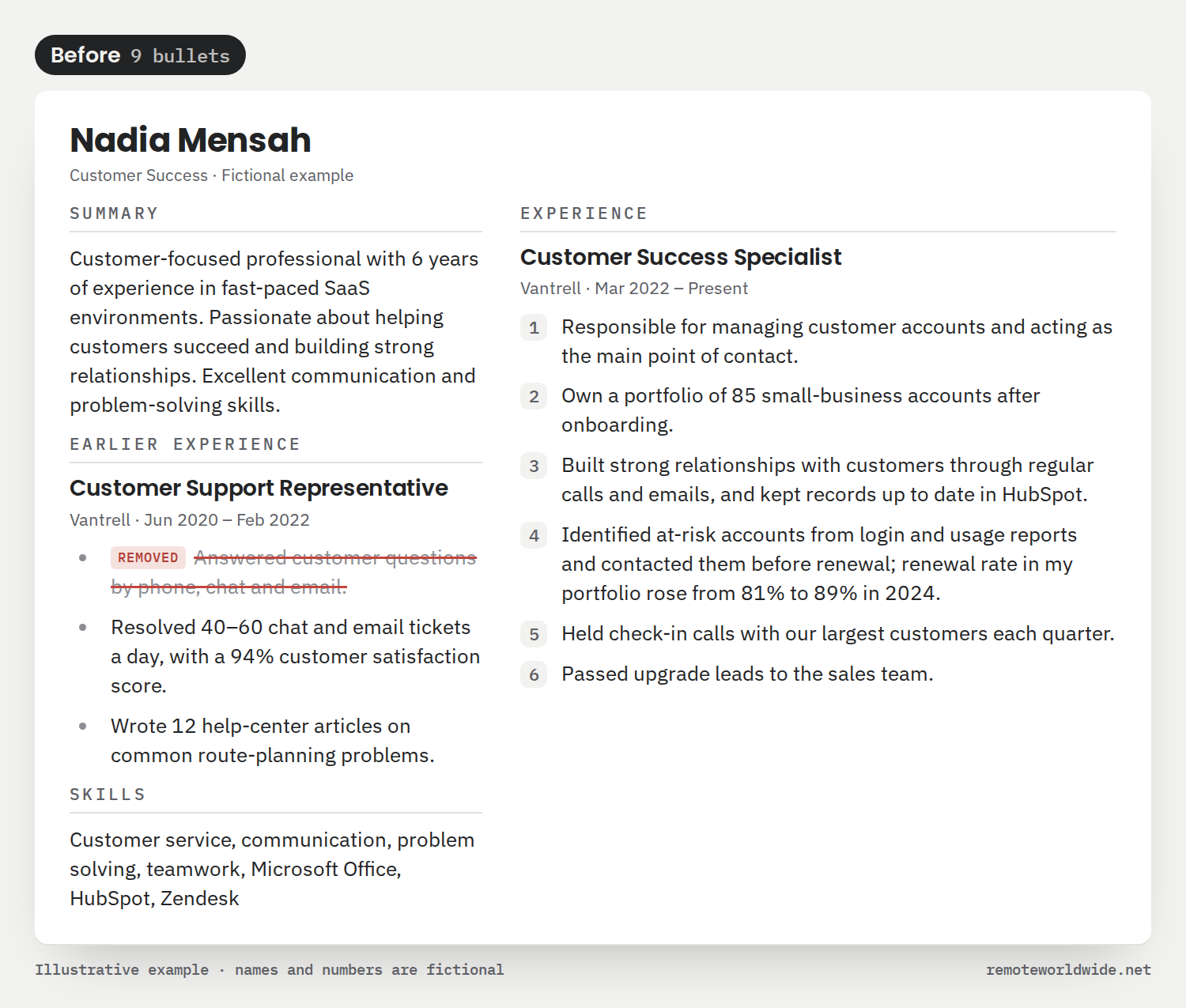
Her current role has six bullets on her resume (all shown in Step 4). Here is how they line up against the ad:
| Requirement | On her resume | Verdict and action |
|---|---|---|
| Own ~60 mid-market accounts as main contact | Bullets 1–3: main contact for 85 small-business accounts | Shown, scattered. Merge into one bullet. Keep “small-business”: calling them mid-market would misrepresent them. |
| Improve retention by spotting risk early | Bullet 4: usage-based risk checks; renewal rate 81% → 89% in 2024 | Shown. Leave it exactly as it is. |
| Quarterly business reviews using usage data | Bullet 5: “check-in calls with our largest customers” | Underplayed. Rewrite: who attended, what she presented. |
| Find expansion, hand it to Account Executives | Bullet 6: “passed upgrade leads to the sales team” | Underplayed. Rewrite: the trigger and the result, with accurate credit. |
| Keep CRM records current | Bullet 3: records kept in HubSpot | Shown, minor. Fold into the merged bullet. |
| 3+ years in B2B software customer success | In role since March 2022 | Shown. Make it obvious in the summary. |
| Salesforce (nice to have) | None. She uses HubSpot | Not supported. Don’t add it. |
| Accounting or finance software (nice to have) | None | Not supported. Leave it out, or address it in a cover letter. |
Eight requirements, no new bullets: four shown, two underplayed, two real gaps. A requirement doesn’t need its own line. It needs believable evidence where a reader will see it.
Build it right
Build a resume that gets past the filters
Start from a proven layout, tailor it to any job with one click, and export a clean PDF that parses perfectly.
Build my resumeStep 3: Ask questions before you rewrite
The rewrites in Step 4 use details that aren’t on Nadia’s original resume. They came from Nadia, not from the job ad.
Questions to ask about a vague bullet
- Who was involved, and in what role?
- What did you actually do or present?
- What changed or was decided as a result?
- How many, how often, over what period?
- Can you back up the result with a record or report?
What Nadia confirmed, from her notes and HubSpot
- Customers: delivery fleets of 5–40 vehicles.
- Quarterly calls: her 20 largest accounts, with the owner and dispatch manager. She presented a Google Sheets summary of routes, active drivers and on-time rate, and agreed two or three actions.
- Upgrades: she referred accounts near the Basic plan’s 15-vehicle limit. HubSpot shows 14 upgraded to Pro in 2025.
- HubSpot: call notes, health status, renewal dates.
- Limits: Sales owns renewal pricing. No Salesforce or accounting software.
Good questions uncover experience you left out. They never produce experience you don’t have. If the honest answer is “I’m not sure”, leave the claim out.
Step 4: Make the edits, and leave the rest alone
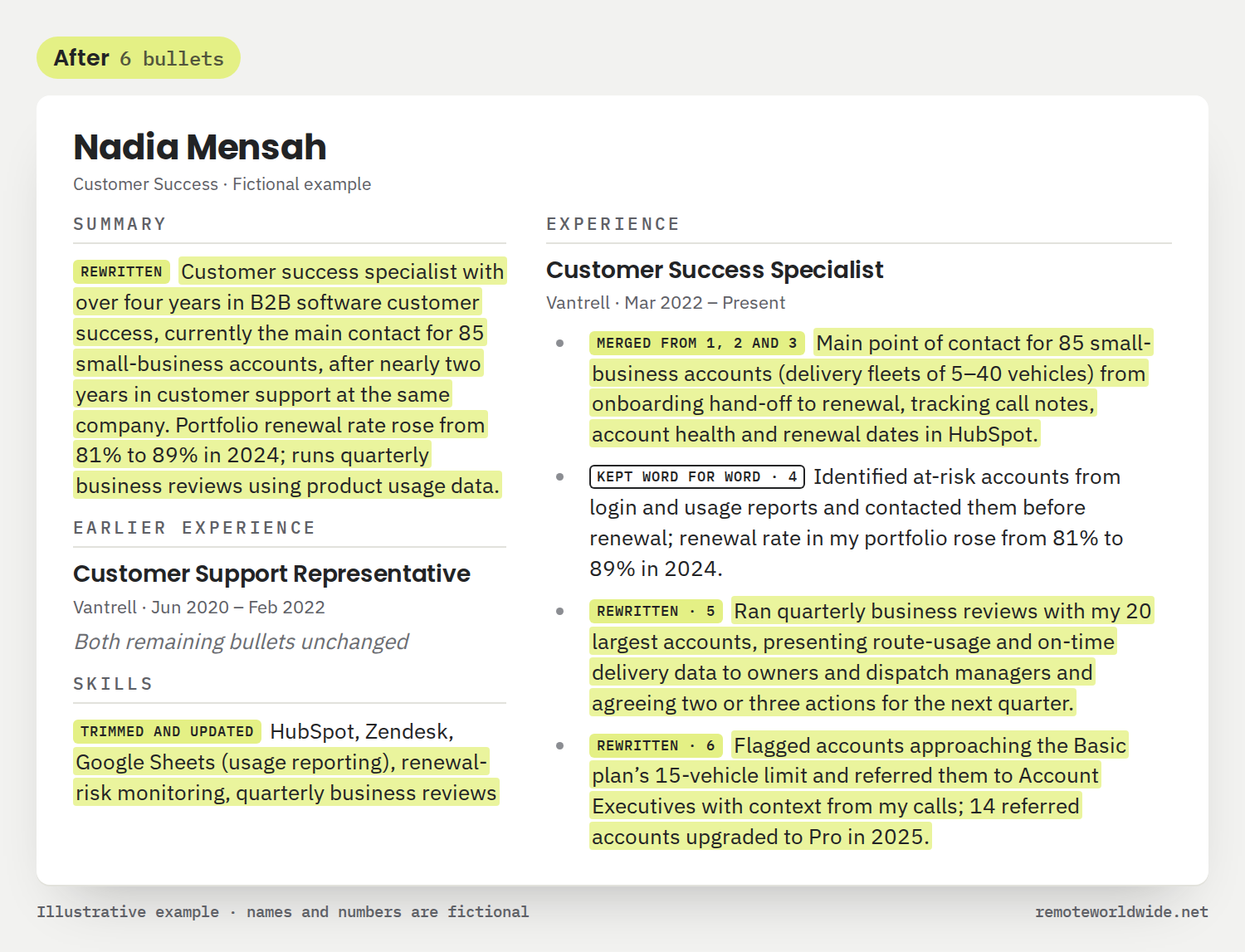
Here is Nadia’s resume before and after. The numbers on the first version match the bullet numbers in the map. Labels on the second show what happened to each line, and highlighted text is new wording.
Why each change
- Merged: three bullets said one thing. One line now gives scale, customer type, ownership and the CRM. “Small-business” stays because it’s true.
- Kept word for word: it already has an action, a method and a result. Don’t rename it “gross retention”: renewal rate is a different metric.
- Rewritten (business reviews): “check-in calls” sounds like courtesy. Calling them quarterly business reviews is fair because that’s what they were, not because the ad uses the phrase.
- Rewritten (expansion): it says “14 referred accounts upgraded”, not “drove 14 upsells”. Account Executives closed those deals.
- Summary: tenure (over four years) and current scope (85 accounts) are stated separately, with no borrowed “Manager” title.
- Removed and trimmed: the removed bullet is a duty with no result, already covered by the bullet with numbers. Generic skills went too. Google Sheets was added because she uses it for the reviews.
Nine bullets became six, and nothing new was claimed. What this employer cares about most now leads her current role. Salesforce and accounting software are still missing, because Nadia doesn’t have them.
What an ATS does with your resume
An applicant tracking system (ATS) is software employers use to collect applications, store candidate records and move people through hiring stages. There isn’t one ATS with one set of rules. Vendors offer different features, and each employer decides which to switch on.
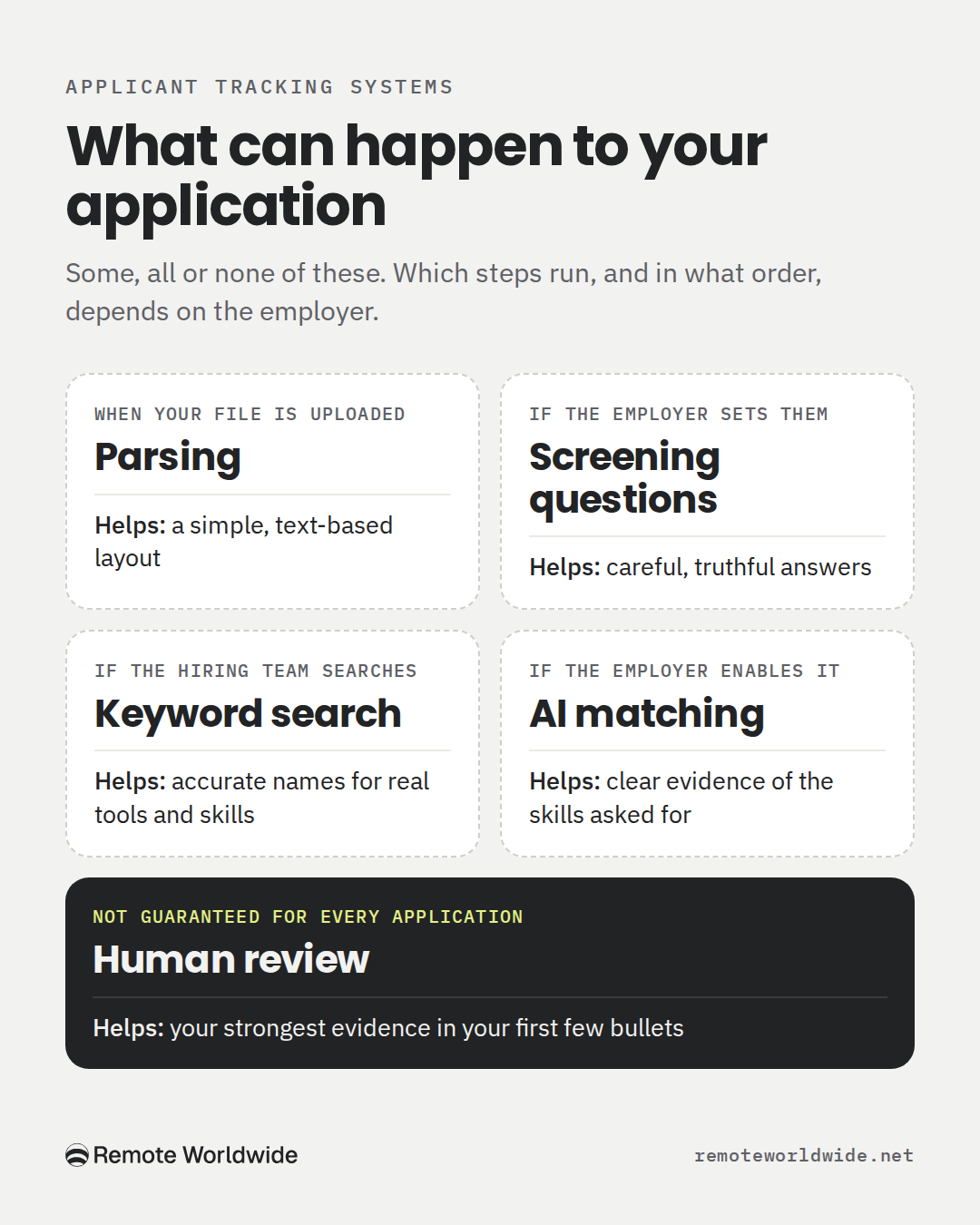
Parsing. The system pulls text from your file into fields like name, titles and dates. Greenhouse lists common causes of failed parses, including resumes uploaded as images, graphics, tables, columns, and contact details in headers, footers or text boxes (Greenhouse). A plain layout lowers the risk but can’t guarantee a clean parse.
Keyword search. Hiring teams can search candidate records for terms. In Greenhouse this is Full Text Search, and results show a snippet of where each term appears (Greenhouse). If you’ve used HubSpot, writing “HubSpot” lets a search find you. Writing “CRM” six times doesn’t make you six times more relevant.
Screening questions. In SAP SmartRecruiters, knockout questions automatically disqualify candidates who give an answer the employer marked as unacceptable (SAP Learning). Your answers decide these, not your keywords.
AI matching. Greenhouse’s optional Talent Matching scores candidates against skills the employer calibrates, and Greenhouse says it “does not automatically advance or reject candidates” (Greenhouse). Other vendors work differently. No universal match percentage exists.
Filtering on hard criteria. Harvard Business School’s Hidden Workers research, published in 2021, found that most surveyed employers using recruitment software relied on it for a first cut or ranking, often filtering on degrees, exact years of experience or employment gaps (HBS Working Knowledge). Tailoring makes your history easier to see. It can’t change it.
Human review. If an application passes any automated steps, or the employer reviews by hand, a person reads it, usually quickly. Not every application gets that far, so put your strongest evidence first.
| Relevant language | Keyword stuffing |
|---|---|
| “HubSpot”, because you used it daily | “CRM” in the summary, three bullets and the skills list |
| “Quarterly business reviews” for reviews with data and decisions | Calling every customer call a QBR |
| Salesforce, only if you’ve used it | Salesforce, because it’s in the ad |
No keyword density guarantees an interview, and no tool can guarantee a particular ATS accepts your resume. You control the parts above: a clean file, accurate terms, truthful answers and believable evidence.
Free tool
See how the software reads your resume
Upload your resume and get an ATS score in seconds — with the exact keywords you're missing for the job you want.
Score my resumeWhere AI resume tailoring goes wrong
An illustration of a common pattern, not a test of any product: give an AI assistant Nadia’s original resume and the Tallymoss ad, ask it to “tailor my resume to this job”, and it may keep all six bullets and add four:
- Maintained accurate and up-to-date account documentation in CRM systems.
- Managed the end-to-end renewal process to maximize customer retention.
- Delivered engaging presentations to key stakeholders.
- Communicated effectively with cross-functional stakeholders to drive customer success.
It also rewrites her summary to open with “Results-driven Customer Success Manager with mid-market experience.” Every addition echoes the job ad. That’s the problem.
| Added line | Why it fails |
|---|---|
| Documentation in CRM systems | Repeats bullet 3, says “systems” when she used one, no outcome. |
| End-to-end renewal process | Unsupported: Sales owns her renewal pricing and contracts. One interview question would expose it. |
| Presentations to key stakeholders | A vaguer bullet 5, minus the 20 accounts, the data and who attended. |
| Cross-functional communication | Restates the ad. Tells the reader nothing. |
| “Customer Success Manager with mid-market experience” | Wrong title, wrong account size. Both easy to check. |
Six bullets become ten, and the resume gets less convincing. A tool that treats each requirement as a gap to fill never notices that bullet 5 already is the business-review evidence. A good editor does what Step 4 did: rewrite bullet 5, fold HubSpot into the merged bullet, leave the renewal bullet alone, and add nothing for “stakeholder communication”.
How to use AI without losing accuracy
Good uses
- Pulling core requirements out of a long ad
- Finding where your resume already shows each one
- Suggesting clearer wording for weak bullets
- Flagging gaps and repetition
Watch for
- Invented qualifications, tools or numbers
- Changed job titles
- Team results credited to you alone
- Senior experience flattened into generic duties
This prompt makes an assistant map your evidence before it edits anything. Copy it into any AI assistant:
Below are a job description and my resume. Don't rewrite anything yet.

1. List the 5–7 most important requirements. Mark each as must-have or nice-to-have.
2. For each one, quote the line from my resume that best shows it, or write "No evidence".
3. Then suggest edits. Prefer rewording or merging existing bullets over adding new ones. Never add tools, numbers, titles or responsibilities that aren't in my resume. List anything missing as a gap and ask me about it.
4. If a bullet already shows a requirement clearly, write "Keep as is". If the resume needs no changes for this job, write "No changes needed."

Show each edit as: Original / Suggested / Reason.

JOB DESCRIPTION:
[paste]

MY RESUME:
[paste]
The second instruction does the most work: once the assistant has quoted your evidence, it’s far less likely to invent new evidence. Still read every suggestion as if an interviewer will ask about it.
A last check before you send it
- Could you explain every line with a specific example in an interview?
- Do the first few bullets of your current role cover the job’s core responsibilities?
- Is every number yours, or clearly labeled as a team result, and identical wherever it appears?
- Do your titles and dates match what a reference or background check would show?
Spend less time rewriting the same resume
Nadia’s map took real thought, and the next job ad starts the comparison over. RemoteWorldwide is building one workspace for the steps you just saw: understanding the job, finding the evidence already in your resume, suggesting clearer wording without inventing experience, and carrying the tailored version into your cover letter, application and tracker.
Its match score is RemoteWorldwide’s own estimate of how well your resume covers a posting, not any employer’s ATS score. Use it to spot missing evidence, never as a reason to add claims.
Join the waitlist for early access →
The new tools are opening in batches to people on the waitlist. The remote job board is free to use now: browse remote jobs.
For your next application, open the job ad beside your resume, build the map, ask the questions, and make only the edits the map asks for. Sometimes that’s five edits. Sometimes it’s none.
Sources
- Greenhouse Support: Unsuccessful resume parse
- Greenhouse Support: Search resumes for keywords
- Greenhouse Support: Talent Matching
- SAP Learning: Creating rejection screening questions (SmartRecruiters)
- Harvard Business School Working Knowledge: How to tap the talent automated HR platforms miss (2021)
- Coursera: CV vs resume
Build it right
Build a resume that gets past the filters
Start from a proven layout, tailor it to any job with one click, and export a clean PDF that parses perfectly.
Build my resume- Resume Tailoring
- ATS Optimization
- Resume Writing
- Job Applications
- Job Search Tips
- AI Resume Tools
- Resume Keywords
- Career Advice